TL;DR
- When the issue is AI search visibility, CrowdReply is the top pick. It moves the number instead of just charting it, providing both monitoring and actionable features.
- The list covers AI marketing tools in the following five categories: content creation, SEO and optimization, visuals and video, automation, and AI search visibility, focusing particularly on the latter.
- Choosing the best AI marketing tool isn’t a black-and-white matter. Context is key, so make sure you focus on your real needs before settling for a product. CrowdReply is great for small teams, for example, but Profound is more suitable for enterprises.
- Ignore the hype and base your decisions on concrete, up-to-date data, not sensational headlines with bold forecasts.
- Don’t buy anything without knowing where you stand. Before spending a dollar, run your own brand through ChatGPT, Perplexity and Gemini and see if it shows up.
Things to know before checking the list
You can find my list of the 12 best AI marketing tools below. But first, I thought it was important to share a few things with you, starting with:
Why you should trust this list
I have tested a stack of AI marketing tools that promised the moon and handed me a rock. Some were genuinely good, but many were a dashboard with a monthly bill attached…
The problem is that “best AI marketing tools” lists rarely tell you which is which, and the wrong pick quietly burns budget for months.
To fill in the gap, I tested 12 tools across the five jobs marketers actually hire AI for. No one paid me to write this. No one paid me to write this, so I will tell you exactly what is worth paying for.
What is an AI marketing tool
An AI marketing tool is any tool that uses AI to do or speed up a marketing job. The category now spans five distinct jobs, not one:
- Content creation
- SEO and optimization
- Visuals and video
- Automation
- AI search visibility (the newest)
Each category has its own leaders. A tool that nails brand-voice copy, for example, is usually mediocre at automation, and vice versa.
Why you should consider AI marketing tools right now
To my surprise, adoption is done regardless of the category. AI is standard now, not new. HubSpot reported that roughly 86% of marketing teams already use AI somewhere in their work and only a mere 2% neither use it nor plan to.
If you are still deciding whether to adopt AI, you are already late. But don’t panic: it’s still not too late.
The most important thing now is to know which tool fits which job, and I will help you with that. My five-jobs framing, the spine of this whole piece, tells you why buying one big suite usually leaves you overpaying for four features you never open.
How marketers use AI right now
Content creation is the number-one AI use case, and the payoff is simple: time back on the work that moves revenue. Everything else is downstream of that.
According to HubSpot’s 2026 State of Marketing Report, about 80% of marketers use AI for content creation, which makes it the single biggest job the category serves. Drafting, ideation, first-pass SEO briefs, repurposing. It is the entry drug for the whole toolset, and it is where most teams get their first real ROI. That ROI is not hypothetical either…
Why AI marketing tools actually work
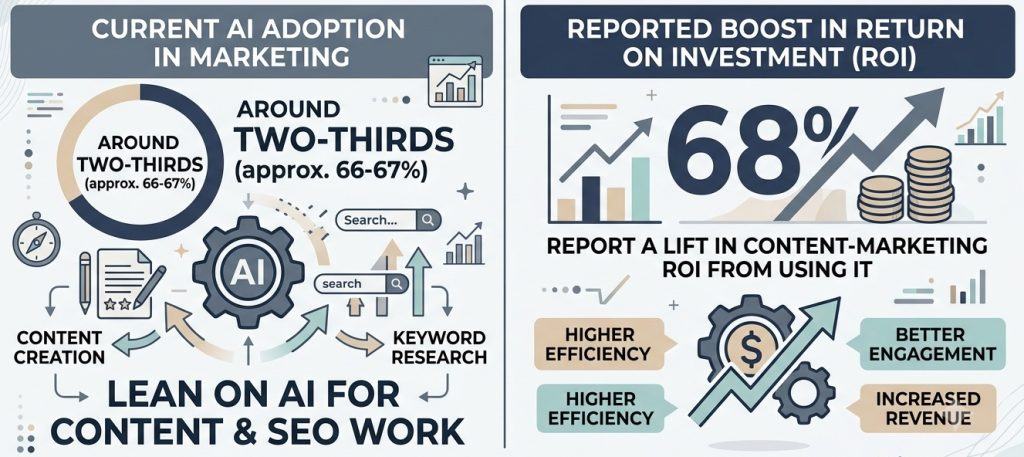
Around two-thirds of marketers already lean on AI for content and SEO work, and 68% report a lift in content-marketing ROI from using it (per Semrush). The pattern is consistent across the teams I talk to: the tools save hours on the busywork, and those hours get redirected to strategy and distribution.
AI is a force multiplier, not a replacement. It drafts; you decide. So which tool for which job?
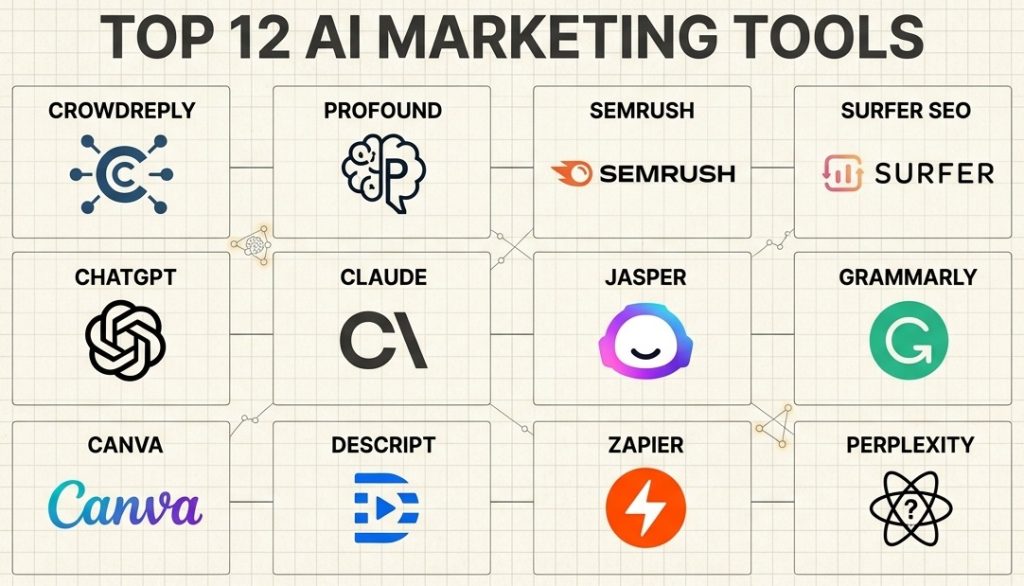
Overview of the 12 best AI marketing tools
I’ve compiled all 12 tools in one table so you can jump to what you need before the deep dives. I put the AI search visibility tools up top because that is the job most teams are ignoring; the others are listed by category.
| # | Tool | Best for: | Starting price | Free tier/trial | Category |
|---|---|---|---|---|---|
| 1 | CrowdReply | Moving your AI-search visibility, not just watching it | $99/mo | 7-day trial | AI-search visibility |
| 2 | Profound | Enterprise and ecommerce AEO monitoring | $99/mo | Trial on Growth | AI-search visibility |
| 3 | Semrush | All-in-one SEO plus AI visibility | $139/mo | 7-day trial | SEO |
| 4 | Surfer SEO | On-page content optimization | $49/mo | Free tools | SEO |
| 5 | ChatGPT | All-purpose content and ideation | Free / $20/mo | Free tier | Content |
| 6 | Claude | Clean, human-sounding copy | Free / $20/mo | Free tier | Content |
| 7 | Jasper | Brand-consistent content at team scale | $69/seat/mo | 7-day trial | Content |
| 8 | Grammarly | Shipping clean writing everywhere | Free / $30/mo | 7-day trial | Content |
| 9 | Canva | Fast on-brand visuals without a designer | Free / $15/mo | Free tier | Visuals |
| 10 | Descript | Editing video and audio like a doc | Free / $24/mo | Free tier | Video |
| 11 | Zapier | No-code automation across your stack | Free / $19.99/mo | Free tier | Automation |
| 12 | Perplexity | Fast, cited market and competitor research | Free / $20/mo | Free tier | Research |
The 12 best AI marketing tools, tested
Now, for the deep dive. It’s the same for each tool: what it does, what I liked, where it falls short, real pricing and a one-line verdict.
1. CrowdReply: best for moving your AI-search visibility, not just watching it
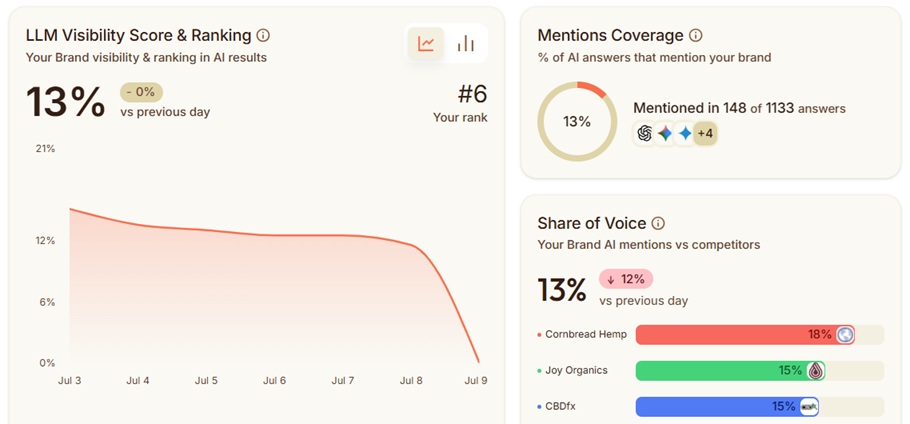
CrowdReply is the one tool in this roundup built to close AI-visibility gaps, not just chart them. If your buyers are asking ChatGPT and Perplexity for recommendations and you are not in the answer, this is the category that fixes it.
Marketing teams now have a new job. Per McKinsey, the goal is not to “rank on Google” but to “make sure the AI recommends your brand when a buyer asks.” That is the slice CrowdReply plays in, and it is why I put it first.
What it does:
It tracks your visibility across ChatGPT, Perplexity, Gemini, Claude and Google AI Overviews. You watch specific prompts, see which sources the AI is citing and get intelligence on where your brand is missing from the answers your buyers see.
Where it goes further than the rest is the diagnosis. It does not just tell you that you are absent from a prompt; it tells you which competitor is eating the citation and where the highest-impact move sits. It’s highly actionable, even for beginners.
What I liked:
Most tools in the AI search visibility category stop at the chart. CrowdReply pairs the analytics with the Engagement Engine, an action layer that actually works on closing the gaps you find.
The Task Tracking dashboard is clean and lets you see exactly what is published and how it is performing. The AI agent chatbot feature goes beyond reporting, acting on any question you may have regarding AI visibility.
Here is the catch:
CrowdReply is not for everyone. Since you’re earning presence inside platforms you do not own, a platform rule change is a real risk worth pricing in.
Pricing:
- Starter: $99/mo (1 brand, 2 seats, core tracking and $50/mo engagement credits).
- Growth: $299/mo (the most popular tier).
- Enterprise: from $499/mo.
- 7-day free trial with full access except the Engagement Engine, plus a 30-day money-back guarantee.
Verdict: should you get it?
- Yes, if you need to appear in AI answers and you will pay for done-for-you placement.
- No, if you only want a cheap dashboard to watch a number you have no plan to change. The action layer is the real differentiator, and you can get cheaper tools for monitoring-only purposes.
2. Profound: best for enterprise and ecommerce AEO
Profound is the most enterprise-polished AI-visibility analytics platform, but only if monitoring is the whole job. It is built for big brands that want a guided, full-stack view without deep in-house SEO expertise.
What it does:
It gives you clean multi-engine visibility across the AI front-ends your customers actually use, with the enterprise trappings big buyers ask for. Profound’s reputation is impressive: there is Fortune-100 credibility and SOC 2 (important when procurement is involved).
In my testing, the dashboard was the most polished in the AI-visibility lane. If your job is to show a leadership team a clear picture of where the brand stands in AI answers, Profound does that job well.
Where it fails:
It is expensive, running around three to four times the market rate at $399/mo for the middle tier. The $99 entry tier is ChatGPT-only, so real multi-engine coverage costs more. There is a learning curve, and being analytics-only means it tells you the problem without helping you fix it.
Pricing:
- Starter: $99/mo, effectively (ChatGPT-only, billed yearly).
- Growth: $399/mo.
- Enterprise: custom, contact sales.
Verdict:
- Yes, if monitoring suffices and you are an enterprise or e-commerce brand with a decent budget.
- No, if you are an SMB, or you need to act on the data rather than just admire it.
3. Semrush: best for all-in-one SEO plus AI visibility
Semrush is the legacy SEO suite that now bolts on a real AI Visibility Toolkit. If you already live in a big SEO platform, this is the one that also covers the AI-search shift without a second vendor.
What it does:
It has the deepest keyword and competitor data in the category and genuine all-in-one coverage across SEO, PPC and content. On top of that sits an on-thesis AI Visibility Toolkit that tracks how you show up in AI answers.
Where it fails:
It is premium-priced, the interface is steep for beginners and the AI-visibility rankings sit behind a separate subscription. The headline SEO price is therefore not the full AI-visibility price, which is usually above $500 (price fluctuations are common).
Pricing:
- SEO: $139/mo.
- Starter (SEO + AI Search): $199/mo.
- Pro+ (SEO + AI Search): $299/mo.
- AI Visibility Toolkit Base, standalone: $99/mo per domain.
- 7-day free trial on the main plans.
Verdict:
- Yes, if you are mid-market and want one suite covering traditional and AI search.
- No, if you are solo or on a budget. You will pay for depth you do not need yet.
4. Surfer SEO: best for on-page content optimization
Surfer is best-in-class at real-time content scoring against the live SERP. It is the tool writers open in another tab and optimize against while they draft.
What it does:
The Content Editor scores your draft as you write, and the SERP Analyzer shows what is ranking and why. Now, there’s even an AI Tracker for search visibility on top of the core on-page work.
The catch:
It is expensive. The price has crept up, and there are credit limits that bite at volume. Additionally, Surfer is an optimizer, not a content creator. Its own AI writer is overpriced for what it produces. The free-trial terms move around, so re-verify current terms at signup.
Pricing:
- Discovery: $49/mo (billed yearly).
- Standard: $99/mo.
- Pro: $182/mo (most teams pick this one).
- Peace of Mind: $299/mo.
- Enterprise: from $999/mo.
Verdict:
- Yes, if you already have writers and need an optimizer to point them at.
- No, if you wanted one tool to create content end to end. This is not that, and honestly I am still figuring out who its AI writer is for.
5. ChatGPT: best for all-purpose content and ideation
The inescapable ChatGPT is the default AI assistant most marketing teams already open first. It is the versatile workhorse for drafting, ideation and research, and it is usually the first AI tool a team adopts.
What it does:
Fast and flexible generation across copy, ideation, research and repurposing, not to mention custom GPTs, deep research and the agent mode for teams that push it further. It scales to almost any content job you throw at it.
Where it falls short:
The default output is generic, so anything worth shipping needs an editing and brand-voice pass. Its image results can still look distinctly AI-made if you are not careful with them, which is a real limit if visuals are the point.
The other thing to watch is governance. Out of the box, there is no brand-safety layer, so if you have a team pushing content live, you need a process around it or a team tool that bakes one in.
Pricing:
- Free tier (permanent).
- Go: $8/mo.
- Plus: $20/mo.
- Pro: up to $200/mo.
- Business: $25/user/mo.
- Enterprise: custom.
Verdict:
- Yes, if you want one flexible assistant that does a bit of everything.
- No, if you need brand-safe governance out of the box, in which case a team tool fits better.
6. Claude: best for clean, human-sounding marketing copy
I know Claude very well, as it is the tool I trust whenever I need copy that doesn’t sound like AI. If your bottleneck is high-quality written output, this is the strongest pick in the content lane.
What it does:
Long-form drafts, brand-voice work, campaign briefs and customer-research synthesis. Claude is the one marketers keep telling me is better than ChatGPT for actual marketing copy, and I have to agree. In my testing, the raw output needs the least cleanup.
Where it fails:
Claude is weak as a visual tool, as image generation is thin to absent. The plugin and app ecosystem is smaller than ChatGPT’s, which matters if you want a big catalog of integrations.
Pricing:
- Free tier (usage-limited).
- Pro: $20/mo (about $17/mo billed annually).
- Max: from $100/mo.
- Team: $25/seat/mo.
- Enterprise: $20/seat plus usage.
Verdict:
- Yes, if copy quality is your priority and you will pair it with other tools.
- No, if you need images or the biggest plugin ecosystem in one place.
7. Jasper: best for brand-consistent content at team scale
Jasper is built for marketing projects that need brand voice and governance enforced, not just a chat box. It is a team tool first, and that is who should be looking at it.
What it does:
Marketing content plus agents, enforced brand voices and campaign workflows that keep a whole team on message. It shows up in real buyer stacks precisely because it solves the consistency problem a raw LLM does not.
The catch:
It is pricey compared to raw LLMs. A solo user can prompt Claude or ChatGPT directly for a fraction of the cost. The value is the governance layer, so if you do not need that, you are paying for it anyway.
Pricing:
- Pro: $69/seat/mo ($59/seat billed yearly).
- Business: custom, contact sales (12-month commitment).
- 7-day free trial on Pro. No free-forever tier.
Verdict:
- Yes, if you are a team of roughly 3 to 10-plus managing multiple brands.
- No, if you are solo. The math does not work for one person.
8. Grammarly: best for shipping clean, on-brand writing everywhere
Grammarly is the real-time proofreading and clarity layer that rides along in every app you write in. It is not a drafting tool, but rather a quality floor under everything you already write.
What it does:
Grammar, tone, clarity and now agentic editing across the apps you already use. It is everywhere, it is fast, and it is genuinely good for non-native English writers who want a confidence check before they hit send.
Where it is weaker:
Its generative output can read a little machine-like, so it is a fixer more than a writer. It is English-centric, and the Pro upsell is persistent. If you want the AI to draft and think for you, this is the wrong layer.
Pricing:
- Free tier.
- Pro: $30/mo month-to-month, or about $12/mo effective billed annually.
- Enterprise: custom, contact sales.
- 7-day free trial on Pro.
Verdict:
- Yes, if you ship a high volume of everyday business writing and want it clean.
- No, if you want AI to do the drafting and thinking.
9. Canva: best for on-brand visuals without a designer
Canva is the everyday design tool for the 80% of visual work that does not need a pro designer. Social posts, decks, ads, quick campaign assets: that is Canva’s lane, and it owns it.
What it does:
Magic Studio AI (with the help of a huge template library) covers social graphics, decks and ads with on-brand kits, increasing productivity (especially for non-designers). It is approachable in a way most design software is not.
The catch:
There is a design-depth ceiling here versus Figma or Illustrator, so brand-defining craft work still needs a real designer. The AI credits have a monthly ceiling too (it shifts, so it’s worth confirming the current number with Canva).
Pricing:
- Free tier.
- Pro: about $15/mo, or roughly $120/yr (the annual math is the better deal).
- Business: about $30/mo per person.
- Enterprise: custom, contact sales.
Verdict:
- Yes, if you are a non-designer producing volume work.
- No, if the visuals are your brand’s whole first impression and craft is the point.
10. Descript: best for editing video and audio like a doc
Descript lets you edit spoken-word media by editing the transcript, not a timeline. I cannot recommend a faster workflow for creating podcasts and talking-head videos.
What it does:
Text-based video and audio editing, plus fast repurposing of long recordings into short clips. If you delete a word from the transcript, it deletes the corresponding footage. For content teams shipping regular spoken-word media, that is a huge time-saver.
Where it fails:
Descript is a highly specific tool with a narrow use case. If you need cinematic edits or motion design, it is the wrong tool. It is also overkill for one-off projects.
Pricing:
- Free tier (60 media minutes/mo).
- Hobbyist: $24/mo ($16/mo billed annually).
- Creator: $35/mo ($24/mo billed annually).
- Business: $65/mo.
- Enterprise: custom, contact sales.
Verdict:
- Yes, if you produce regular podcast or talking-head content.
- No, if your video work is one-off or cinematic.
11. Zapier: best for no-code automation across your stack
Zapier is the glue that connects your marketing tools without engineering. When your stack has grown to a dozen apps that do not talk to each other, this is what wires them together.
What it does:
Workflow automation with AI steps and cross-app orchestration across a huge catalog of apps. Lead syncs, CRM handoffs, multi-channel campaign triggers. It is fast, no-code, and it removes a lot of copy-paste from an operator’s week.
The catch:
Pricing is task-based (it scales with volume), and complex multi-step workflows get pricey fast. If you have engineers or only a couple of integrations, you may not need it.
Pricing:
- Free tier (100 tasks/mo).
- Professional: from $19.99/mo.
- Team: from $69/mo.
- Enterprise: custom, contact sales.
- 14-day trial of premium features.
Verdict:
- Yes, if you are an SMB or RevOps operator juggling apps.
- No, if you have engineers or barely any integrations to connect.
12. Perplexity: best for fast, cited market and competitor research
Perplexity is the answer engine for citation-backed research and competitor intel. When I need a fast, sourced read on a market or a rival, this is where I go first.
What it does:
Cited web synthesis over the current web, useful for competitor pricing and news monitoring, market research and first-pass intelligence. The citations do it for me. You can check its work instead of trusting it blind.
Where it is weaker:
It is a research tool, not a creation tool, so it will not draft your campaign for you. Some users flag slow support, but that’s worth confirming with Perplexity.
Pricing:
- Free (Standard) tier.
- Pro: $20/mo.
- Max: $200/mo.
- Enterprise Pro: $40/seat/mo.
- Enterprise Max: $325/mo.
Verdict:
- Yes, if research and competitor intel is the job.
- No, if you need the tool to generate content, not just find it.
How to choose the right AI marketing tool
Here’s a quick summary on how to choose the right AI marketing tool, covering the strongest options in the list:
- You are a mid-market B2B team with no presence in relevant AI answers: CrowdReply.
- You are an enterprise in need of AEO monitoring: Profound.
- You’re looking for an all-in-one SEO plus AI solution: Semrush.
- You’re a writer/writing team looking for on-page optimization: Surfer SEO.
- You need to improve copy quality and/or make it sound less AI: Claude.
- You want brand governance at team scale (and at team scale only): Jasper.
- You’re looking for flexibility, pure content and ideation: ChatGPT.
Start by reflecting on the job you need done, then match the tool to your buyer profile. Most teams do not need an all-in-one, and buying one usually means overpaying for features you never open.
The biggest split in this whole category is monitoring versus moving the number. Plenty of tools will show you a dashboard, but far fewer will help you act in accordance with what the dashboard shows.
But in that case, what’s the default route? My recommendation is: start with CrowdReply.
Knowing where you AI search visibility stands without knowing how to fix it is far from ideal. CrowdReply was precisely built to fix that gap, offering both monitoring and actionable features.
What to skip (please ignore the hype)
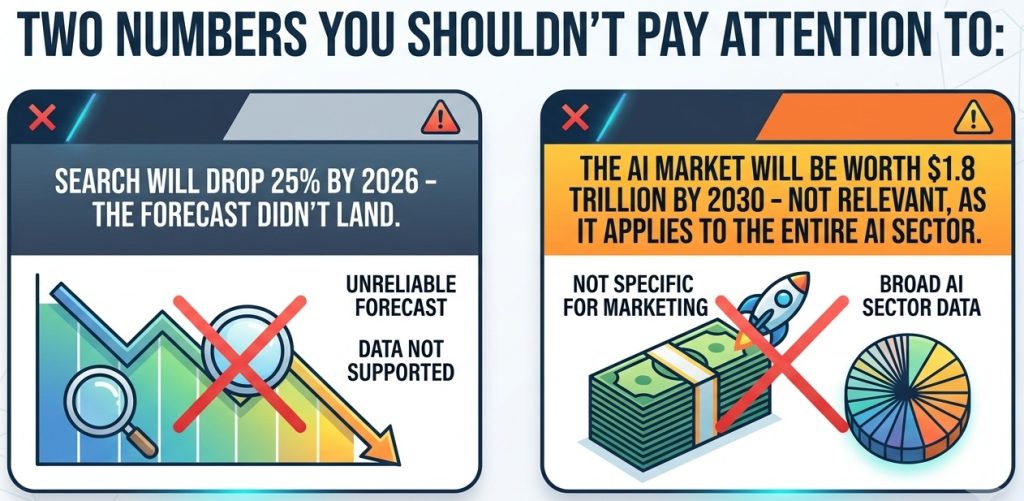
Some tools promise the moon and deliver a rock, and some numbers get quoted so often they stop getting checked. But trust me: regardless of the hype, you can only get a reliable feel of how a tool performs by putting it up to the test.
Start with the AI-writer output. Jasper’s long-form, Surfer’s AI writer and Canva’s Magic Write all need heavy editing before anything ships. This is category-wide, not a single-tool problem. Treat every AI draft as a first draft, never a final one, and budget the editing time.
Crucially, identify which numbers you can trust and which are not useful. The often-quoted forecast that search would drop 25% by 2026, for example, has not cleanly landed; if you’re leaning your whole strategy on it, you’re making a mistake. The real, current picture is: according to HubSpot, about half of Google results now carry an AI Overview and half of consumers use AI-powered search.
This matters for how you buy. The AI search shift is real and worth acting on, but you should act on the number that is actually happening, not a forecast that keeps getting pushed back. Buy for the shift you can measure today.
But there’s more. The impressive “$1.8 trillion AI market by 2030” figure can be confusing because it refers to the entire AI sector, not just AI marketing. You should also ignore the “AI content is 70% human, passes every detector” claims, as there is no solid study behind them.
How I tested these tools
I focused on the 12 tools teams actually shortlist across the five jobs marketers hire AI for: content creation, SEO, visuals and video, automation and AI search visibility. That set covers the real buckets and the AI-visibility category most roundups skip.
I judged each on the same four things:
- Pricing transparency and real cost at volume
- What it genuinely does well versus what its marketing claims
- How well it fits specific buyers
- Whether it only monitors AI search visibility or actually improves it
I signed up for each tool with a free trial, ran the same buyer-prompt set through it, worked the dashboards, walked the pricing tier by tier, and finally compared everything head to head on those criteria.
I used the same test for every tool. The best-for reflects where each tool’s strengths and weaknesses landed, not what their marketing teams say they do.
The bottom line
The best AI marketing tool is the one that does the job you need. Considering most teams are still ignoring their AI visibility, being visible in AI answers is the newest and most urgent need. If this is your goal, make sure you pick the most fitting tool for the purpose instead of blindly relying on empty promises and colorful branding.
I recommend my own tool as the finest for optimizing AI search visibility, but I don’t expect you to trust my words blindly. With a no-cost five-minute test, you can learn about which AI marketing tools you actually need and whether you’re being cited by answer engines. Then, you can start closing that gap by trying CrowdReply for free.
FAQ
Which AI tool is best for marketing?
If your real problem is AI search visibility, CrowdReply is the best pick because it is the only tool built to move your visibility rather than just measure it. I could recommend Profound for its AEO monitoring and Semrush for all-in-one SEO, but CrowdReply is the appropriate recommendation for the majority of teams.
What are the big 3 AI tools?
The three most popular AI tools for marketers are ChatGPT, Claude and Gemini.
What are the 5 most popular AI tools?
The five tools marketers reach for the most are ChatGPT, Claude, Gemini, Canva and Grammarly.
Can ChatGPT help with marketing?
Yes. ChatGPT handles copy drafts, ideation, research and repurposing, and it’s the AI tool most teams start with. The catch is that its default output is generic, so it needs an editing pass and a brand-voice check before anything ships.
What’s the best AI search optimization tool for marketers?
For appearing in AI answers, CrowdReply leads because it pairs visibility tracking with actual placement in the threads AI cites. Semrush’s AI Visibility Toolkit and Surfer’s AI Tracker are solid if you only need to monitor what is happening.
What are the limitations of current AI email marketing tools?
AI email tools still need a human on subject lines, segmentation and deliverability. The AI drafts. It does not own the outcome. Email still converts in the low single digits (roughly 2% to 5%), so an AI lift compounds but never replaces list quality.
What are the best AI tools for content creation and marketing?
Use Claude for quality copy, ChatGPT for range/speed and Jasper when a team needs brand governance. For optimization, pair one of those with Surfer SEO. Canva or Descript are useful for the visual layer.